Search

Items tagged with: vivaldibrowser


Where do you usually search from in the browser? 🤔

#Browser #SearchEngine #VivaldiBrowser #Vivaldi #WebBrowser #Search

  • Address field (81%, 388 votes)
  • Dedicated search field (11%, 57 votes)
  • Quick Commands (2%, 11 votes)
  • Start Page search field (4%, 22 votes)
478 voters. Poll end: Wednesday, November 12, 2025, 2:23 PM


The media in this post is not displayed to visitors. To view it, please go to the original post.

Tip #766

Find things faster in Vivaldi on iOS with Custom Search Engines.

A lot of what we do on the web involves searching for information. Whether doing a generic search or looking things up on a frequently visited website, using the right search engine can help you get to the right search results in no time. In Vivaldi on iOS, you can add your own search engines, give them nicknames, and even make the one you love your default.

To add a custom search engine in Vivaldi on iOS:

  1. Go to Settings > Search Engine > Add Custom Search Engine.
  2. Enter the name of the new search engine.
  3. Type in a short and unique nickname.
  4. Insert the search URL, and if you wish to receive suggestions from the search engine as you type, also the Suggest URL.
  5. Optionally, expand the More Options section to enter POST parameters and, in case the search engine offers reverse image search, also the Image Search URL.
  6. Tap Done.

To get the Search URL, either:

  • Look for it in the search engine’s documentation.
  • Do a test search on the search engine’s website, copy the URL and replace the search keyword with %s.


Vivaldi browser on two iPhones. The one on the left shows a page in Settings to add a new search engine. The one on the right shows the list of available search engines, including custom ones.
#customization #iOS #search #Vivaldi #VivaldiBrowser

vivaldi.com/blog/tips/tip-766/


The media in this post is not displayed to visitors. To view it, please go to the original post.

Tip #763

Copy web page titles from the Tab Bar.

Whether for sharing, document naming, issue reporting or something else. Sometimes it’s good to get the full web page title, especially if it’s not displayed on the page itself.

To copy the web page title in Vivaldi:

  1. Double-click on the tab or right-click on the tab and select “Rename” from the menu.
  2. While the title is selected, press CTRL / ⌘ + C on your keyboard.


Vivaldi browser window with one of the open tab's title texts highlighted while in renaming mode. A box with the text "CTRL / ⌘ + C" is above the browser window.
#Vivaldi #VivaldiBrowser #webPages

vivaldi.com/blog/tips/tip-763/


Introduced me to so many new and interesting things for me! 🥰

I guess I would have not discovered #VivaldiBrowser without it, and I would have probably been an #avid #gamer or a guy who thought he knew much, when he actually doesn't.
Now, I at least know how much I don't, and I'm interested in more advanced things I would have not known about in #MSWindows!

#Viva #Linux! :tony_happy:

#WindowstoLinux


The media in this post is not displayed to visitors. To view it, please go to the original post.

Tip #759

iOS 版 Vivaldi でリーダービューを有効にして、快適に記事を読もう

iOS 版 Vivaldi のリーダービューは、ウェブページ上の気が散る要素をすべて取り除き、記事の内容に集中して落ち着いて読むことができるようにします。

リーダービューに切り替えるには:

  1. リーダービューに対応した内容のウェブページを開く
  2. アドレスバーの「リーダービュー」ボタンをタップする

リーダービューを終了するには、同じボタンをタップする
iPhone 上の Vivaldi ブラウザで、ウェブページにリーダービューが有効になっています。矢印がアドレスバーのリーダービューボタンを指しています。<br&gt;
#iOS #vivaldi #VivaldiBrowser #ウェブページ #リーダービュー

vivaldi.com/ja/blog/tips/ios-t…


The media in this post is not displayed to visitors. To view it, please go to the original post.

Tip #760

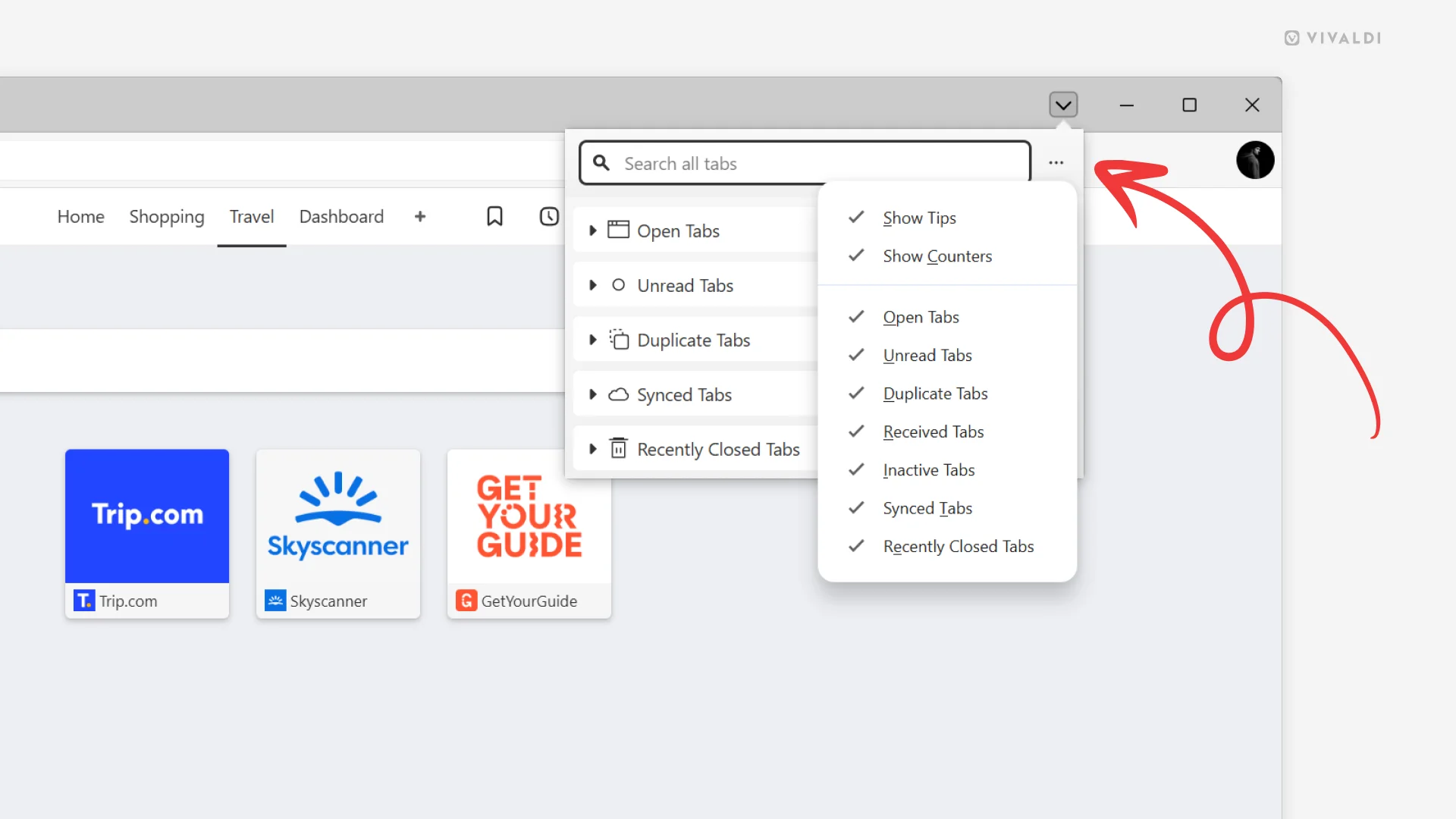
Choose which sections in the Tab Button popup are visible from the Display Options menu.

You may find some sections in the Tab Button popup irrelevant to your workflow. If that’s the case, hide them and enjoy using a Tab Button that fits your needs perfectly.

To hide sections you don’t use.

  1. Open the pop-up menu.
  2. Open the Display Options menu by clicking on the 3-dot menu button in the top right corner.
  3. Click on the section names on the menu to toggle their visibility off or on.
  4. Click outside the menu to close it.


Top right corner of the Vivaldi browser window with the Tab Button popup open. On top of that, there's a Display Options menu open and an arrow points at the 3-dot menu button from which the menu is opened from.
#customization #Tabs #Vivaldi #VivaldiBrowser

vivaldi.com/blog/tips/tip-760/


Stumbled upon it one day in #Ubuntu's app store's “New and Updated” section. 'Twas actually the #Flatpak version, which doesn't really have the best #images and #description, as it's #unofficial, so I wasn't drawn to it at first, but just kept in my #mind. A few days later, #BraveBrowser started having a lot of #issues (it was my bad, actually, but anyway) and I switched to #MicrosoftEdge for a while. A little time after, I found out about some ugly things M$ does through its #browser, and looked for an #alternative. #Browsers like #Brave were already too #basic for me, after using #Edge, and thus, when I saw #Vivaldi as a powerful alternative, I didn't hesitate a moment and tried it.

That's the most #important part of the story, but… there's a second #volume: At first, I was like a #crazy #chicken in front of a pot full of #earthworms, so… I obviously broke the browser in just one, two days. In the meanwhile, I also managed to repair Brave, and I was thinking of leaving V, considering it too #buggy. But luckily, I decided to give it one more chance, this time being more #cautious about #messing up with #settings… and here I am!

You might call me a very #wise person, since I didn't #giveUp immediately, but the #truth is… I was simply #mesmerized by it… :tony_happy:

#VivaldiBrowser #VivaldiTechnologies


Great!
Very beautiful post and attached video.
I like #VivaldiBrowser more and more every day


Congratulations on the magnificent release of Vivaldi 7.6. The Vivaldi team has once again done a great job and made what was already the best browser in the world even better. That's a reason to celebrate. Many thanks to the entire Vivaldi team. 🥳🎈🥂🍾🎉🎊

#release #browser #VivaldiBrowser #web #Technology #madeineurope