Search

Items tagged with: http


The media in this post is not displayed to visitors. To view it, please go to the original post.

Das Fediverse verstehen: Wie ActivityPub soziale Netzwerke neu denkt

In den letzten Jahren taucht immer häufiger ein Begriff auf, wenn es um alternative soziale Netzwerke geht: Fediverse. Doch was steckt dahinter? Wie funktioniert das zugrunde liegende Protokoll ActivityPub – und welche Plattformen gehören eigentlich dazu?

Was ist das Fediverse?

Das Wort „Fediverse“ setzt sich aus Federation (Föderation) und Universe zusammen. Gemeint ist ein Netzwerk aus vielen unabhängigen Servern (Instanzen), die miteinander kommunizieren können.

Im Gegensatz zu klassischen sozialen Netzwerken wie Facebook oder X (Twitter), die zentral betrieben werden, ist das Fediverse dezentral organisiert:

Jeder kann einen eigenen Server betreiben
Jede Instanz hat eigene Regeln und Moderation
Nutzer können instanzübergreifend miteinander interagieren

Das Ergebnis ist ein offenes, vernetztes Ökosystem statt einer einzelnen Plattform.

Das Herzstück: Wie ActivityPub funktioniert

ActivityPub ist ein offener Standard (W3C), der definiert, wie Server im Fediverse miteinander kommunizieren.

Im Kern basiert ActivityPub auf zwei Konzepten:

1. Akteure (Actors)

Jeder Nutzer, jede Gruppe oder auch ein Bot ist ein sogenannter Actor.
Beispiel:

@user@server.de
2. Aktivitäten (Activities)

Alles, was passiert, wird als Aktivität beschrieben:

Post erstellen → Create
Folgen → Follow
Liken → Like
Teilen → Announce

Ein einfaches Beispiel

Angenommen, du bist auf Server A und folgst jemandem auf Server B:

Du klickst auf „Folgen“
Server A sendet eine Follow-Anfrage an Server B
Server B bestätigt diese
Neue Beiträge werden automatisch an Server A übertragen

Das Ganze passiert über HTTP und JSON – technisch ähnlich wie moderne Web-APIs.

Inbox & Outbox Prinzip

ActivityPub nutzt ein klares Kommunikationsmodell:

Outbox: Hier sendet ein Nutzer seine Aktivitäten
Inbox: Hier empfängt ein Nutzer Aktivitäten anderer

Jeder Server verwaltet diese Strukturen und verteilt Inhalte an andere Server.

Vorteile von ActivityPub
Dezentralität: Keine zentrale Kontrolle
Interoperabilität: Verschiedene Plattformen können zusammenarbeiten
Datensouveränität: Nutzer wählen ihren Server selbst
Ausfallsicherheit: Kein Single Point of Failure

Bekannte Plattformen im Fediverse

Das Fediverse besteht nicht aus einer Plattform, sondern aus vielen, die miteinander kompatibel sind:

🐘 Mastodon
Microblogging (ähnlich wie Twitter/X)
Der bekannteste Vertreter des Fediverse
📷 Pixelfed
Fokus auf Bilder (Instagram-Alternative)
🎥 PeerTube
Dezentrale Videoplattform (YouTube-Alternative)
✍️ WriteFreely
Blogging-Plattform
💬 Lemmy
Link-Aggregator (ähnlich Reddit)
🎨 Funkwhale
Musik-Streaming im Fediverse
Warum das Fediverse gerade jetzt relevant ist

Viele Nutzer suchen nach Alternativen zu großen Plattformen – aus Gründen wie:

Datenschutzbedenken
Algorithmische Kontrolle
Kommerzialisierung von Inhalten

Das Fediverse bietet hier einen anderen Ansatz: offen, gemeinschaftlich und unabhängig.

Herausforderungen

So vielversprechend das Fediverse ist, es bringt auch Herausforderungen mit sich:

Komplexität für Einsteiger
Unterschiedliche Moderationsregeln
Teilweise fragmentierte Nutzererfahrung
Fazit

Das Fediverse ist mehr als nur eine Alternative zu bestehenden sozialen Netzwerken – es ist ein grundlegender Perspektivwechsel.
Mit ActivityPub als technischem Fundament entsteht ein offenes Netzwerk, das Vielfalt und Kontrolle zurück in die Hände der Nutzer legt.

#Fediverse #ActivityPub #Dezentralisierung #OpenWeb #SocialMedia #Web3 (optional) #Internet #DigitaleSouveränität #OpenSource #Protokolle #WebStandards #APIs #JSON #HTTP #SoftwareArchitektur #Mastodon #Pixelfed #PeerTube #Lemmy #Funkwhale #WriteFreely #Datenschutz #Digitalisierung #Netzpolitik #AlternativeSocialMedia #Community #Bloggen #TechBlog #DigitalTrends #Internetkultur


Sniffnet sieht prima aus und zeigt dir in Echtzeit, was dein Gerät im Netz treibt: Verbindungen, Ziele, Traffic-Muster. Open Source, plattformübergreifend, ohne Cloud-Zwang. 👍

Aber: Inhalte liest es nicht mit. HTTPS bleibt verschlüsselt. Für echte Analyse brauchst du Tools wie Wireshark oder MitM-Ansätze.

Fazit: Gutes Monitoring-Tool – aber kein Forensik-Werkzeug. 👇

github.com/GyulyVGC/sniffnet

#HTTP #HTTPS #Wireshark #Sniffnet #MITM #Netzwerk #Network #Security #Sicherheit #Datenschutz #Privacy

/kuk


The media in this post is not displayed to visitors. To view it, please go to the original post.

Mastodon Now Sends Referer Headers! Hurrah!


shkspr.mobi/blog/2024/12/masto…

Back in 2022, I wrote this rather grumpy post on Mastodon, the federated social media platform.

@Edent@mastodon.social

Terence Eden

Mastodon
Mastodon enforces a "noreferrer" on all external links.

I have mixed feelings about that.

As a blogger, I want to see *where* visitors are coming from. I also like to see (and sometimes join in) with the conversations they're having.

But, I get that people want privacy and don't want to "leak" where they're visiting from.

Is it such a bad thing to tell a website "I was referred from this specific server"?


❤️ 61💬 16🔁 2907:09 - Fri 11 November 2022


When you click on this link - bbc.co.uk/news - your browser says "Hey! BBC! Please can I have your /news page? BTW, I was referred here by shkspr.mobi. THANKS!" This is called the "Referer" and, yes, it is mispelt.

One the one hand, sending the referer is good; it lets the linked-to server know who is linking to it. That allows them to see where traffic is coming from. On the other hand, this could be bad for much the same reason.

If you run a server anarcho_terrorists.biz, you probably don't want the FBI knowing that your members are sharing links to their pages. If you run a small personal server, you may not want anyone knowing that you personally linked to them. If you run a server for a marginalised community, you may not want a hate-site to know your members are linking to you.

But if you're a large-ish, general purpose, non-private site - like Mastodon.social - where's the harm in allowing referer headers?

Anyway, for historic reasons, Mastodon blocked the referer header. This, I believe, was sensible for smaller servers but a miss-step for larger servers. As I pointed out last week:

@Edent@mastodon.social

Terence Eden

Mastodon
Two years later.

Want to know one of the major reasons Mastodon didn't catch on with journalists and large website owners?

It is *invisible* in referrer statistics.

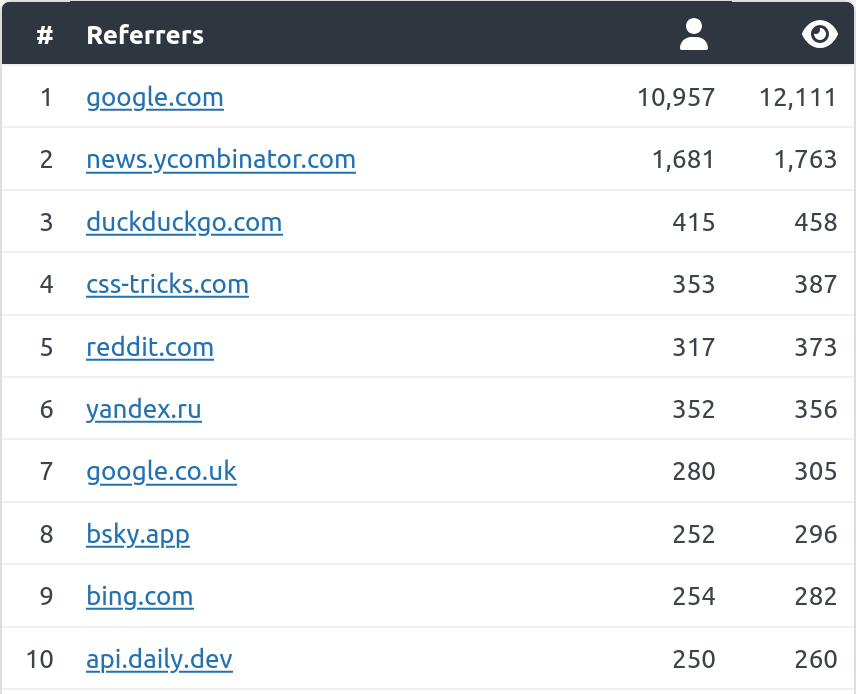
Here's my blog from the last month.

BlueSky now sends me more traffic than Bing.

How much traffic does Mastodon send? It is impossible to know due to the "noreferrer" header in all links.

(I'm not saying your privacy isn't important. But you can't grow a community if no-one knows you exist.)

1 google.com 10,957 12,1112 news.ycombinator.com 1,681 1,7633 duckduckgo.com 415 4584 css-tricks.com 353 3875 reddit.com 317 3736 yandex.ru 352 3567 google.co.uk 280 3058 bsky.app 252 2969 bing.com 254 282


❤️ 305💬 57🔁 24812:48 - Sat 07 December 2024


I'm not the only one to make this point - it has been a popular complaint for some time.

A few days ago, Mastodon changed to allow this to be configurable.

This is excellent news. Website owners will be able to (somewhat) accurately see how much traffic Mastodon sends them. That way they can determine if there is a suitably large audience to engage with on the Fediverse.

It is, of course, slightly more complicated than that!

  • Instance owners can opt-in to allowing Referer headers (it is off by default).
  • The policy means that only the domain name is sent; not the full page.
  • Mastodon is federated and there are thousands of sites. Even if they all opted-in, their statistics will be fragmented.
  • Apps can set their own Referer header - leading to more fragmentation.
  • Even if they do opt-in, users can set their browsers not to send Referer headers.

Nevertheless, I'm delighted with this change. Hopefully it will allow the Fediverse to grow and attract more users.

#fediverse #http #mastodon


The media in this post is not displayed to visitors. To view it, please go to the original post.

A simple(ish) guide to verifying HTTP Message Signatures in PHP
shkspr.mobi/blog/2024/02/a-sim…

Mastodon makes heavy use of HTTP Message Signatures. They're a newish almost-standard which allows a server to verify that a request made to it came from the person who sent it.

This is a quick example to show how to verify these signatures using PHP. I don't claim that it covers every use-case, and it is no-doubt missing some weird edge cases. But it successfully verifies messages sent by multiple Fediverse servers.

Let's step through it with an example of a message sent from Mastodon to my server.

Headers


The HTTP request starts with these headers:

User-Agent:  http.rb/5.1.1 (Mastodon/4.3.0-nightly.2024-02-23; +https://mastodon.social/)Host:  example.comDate:  Sun, 25 Feb 2024 10:48:22 GMTAccept-Encoding:  gzipDigest:  SHA-256=Hqu/6MR2imi8DTzbNp5PNEAFSyk0poN7+x5F+Z4vZMg=Content-Type:  application/activity+jsonSignature:  keyId="https://mastodon.social/users/Edent#main-key",algorithm="rsa-sha256",headers="(request-target) host date digest content-type",signature="P07V5I2zflR8FRsDMHshHmhgOwSkjWevujEbOyKMwjycrdVXjTD0ACiLuc5lTqDEXZ/...4eg=="Connection:  Keep-AliveContent-Length:  2857

Some of those you may be familiar with, some not. The first thing we'll do is a sanity check; was this message sent recently? Because clocks drift in and out of synchronisation, we'll check if the message was within ±30 seconds.
$headers = getallheaders();if ( !isset( $headers["Date"] ) ) { return null; }  //  No date set$dateHeader = $headers["Date"];$headerDatetime  = DateTime::createFromFormat('D, d M Y H:i:s T', $dateHeader);$currentDatetime = new DateTime();// Calculate the time difference in seconds$timeDifference = abs( $currentDatetime->getTimestamp() - $headerDatetime->getTimestamp() );return ( $timeDifference < 30 );

That was easy! On to the next bit.

Digest


A message posted to the server usually has a body. In this case it is a long string of JSON data. To ensure the message hasn't been altered in transit, one of the headers is:

Digest:  SHA-256=Hqu/6MR2imi8DTzbNp5PNEAFSyk0poN7+x5F+Z4vZMg=

That says, if you do a SHA-256 hash of the JSON you received, and convert that hash to Base64, it should match the digest in the header.
$digestString = $headers["Digest"];//  Usually in the form `SHA-256=Hqu/6MR2imi8DTzbNp5PNEAFSyk0poN7+x5F+Z4vZMg=`//  The Base64 encoding may have multiple `=` at the end. So split this at the first `=`$digestData = explode( "=", $digestString, 2 );$digestAlgorithm = $digestData[0];$digestHash = $digestData[1];//  There might be many different hashing algorithms//  TODO: Find a way to transform these automaticallyif ( "SHA-256" == $digestAlgorithm ) {    $digestAlgorithm = "sha256";} else if ( "SHA-512" == $digestAlgorithm ) {    $digestAlgorithm = "sha512";}$json = file_get_contents( "php://input" );//  Manually calculate the digest based on the data sent$digestCalculated = base64_encode( hash( $digestAlgorithm, $json, true ) );return ( $digestCalculated == $digestHash );

But, of course, if someone has manipulated the JSON, they may also have manipulated the digest. So it is time to look at the signature.

The Signature


Let's take a look at the signature header:

Signature:  keyId="https://mastodon.social/users/Edent#main-key",  algorithm="rsa-sha256",  headers="(request-target) host date digest content-type",  signature="P07V5I2zflR8FRsDMHshHmhgOwSkjWevujEbOyKMwjycrdVXjTD0ACiLuc5lTqDEXZ/...4eg=="

This contains 4 pieces of information.
  1. keyID - a link to the user's public key.
  2. algorithm - the algorithm used by this signature.
  3. headers - the headers which make up the string to be signed.
  4. signature - the signature string.

Let's split them up so they can be used:

//  Examine the signature$signatureHeader = $headers["Signature"];// Extract key information from the Signature header$signatureParts = [];//  Converts 'a=b,c=d e f' into ["a"=>"b", "c"=>"d e f"]               // word="text"preg_match_all('/(\w+)="([^"]+)"/', $signatureHeader, $matches);foreach ($matches[1] as $index => $key) {    $signatureParts[$key] = $matches[2][$index];}

Let's tackle each part in order.

Get the user's public key


You might think you can just get `mastodon.social/users/Edent#ma… - but you would be wrong.

Firstly, you need to tell the key server that you want the JSON representation of the URl - otherwise you'll end up with HTML.

$publicKeyURL = $signatureParts["keyId"];$context   = stream_context_create(    [ "http" => [ "header" => "Accept: application/activity+json" ] ] );$userJSON  = file_get_contents( $publicKeyURL, false, $context );

That gets you the JSON representation of the user. On Mastodon, the key can be found at:
Screenshot of JSON. As described in text.

I don't know how to automatically find the key, so I've hard-coded its location.

$userData  = json_decode( $userJSON, true );$publicKey = $userData["publicKey"]["publicKeyPem"];

Get the algorithm


This is rather straightforward. It's just the text in the signature header:

$algorithm = $signatureParts["algorithm"];

Reconstruct the signing header


Let's take a look at the third piece of the puzzle:

headers="(request-target) host date digest content-type"

This says "The signature is based on the following parts in order". So we only care about the headers which make up the request, the host, the date, the digest, and the content type. Other servers may require different parts of the headers.

Again, let's tackle them in order.

(request-target)


This means the method of the request and the target it was sent to. In our example, this is a POST sent to the path /inbox.

host


This is the HTTP host the message was sent to. This should be retrieved from the server, not taken from the sent headers.

date digest content-type


These are the values from the headers which were sent with the request.

Putting it all together


Annoyingly, the HTTP headers are written in Title-Case whereas the headers in the Signature are in lower-case. So some conversion is necessary:

//  Manually reconstruct the header string$signatureHeaders = explode(" ", $signatureParts["headers"] );$signatureString = "";foreach ($signatureHeaders as $signatureHeader) {    if ( "(request-target)" == $signatureHeader ) {        $method = strtolower( $_SERVER["REQUEST_METHOD"] );        $target = strtolower( $_SERVER["REQUEST_URI"] );        $signatureString .= "(request-target): {$method} {$target}\n";    } else if ( "host" == $signatureHeader ) {        $host = strtolower( $_SERVER["HTTP_HOST"] );            $signatureString .= "host: {$host}\n";    } else {        //  In the HTTP header, the keys use Title Case        $signatureString .= "{$signatureHeader}: " . $headers[ ucwords( $signatureHeader, "-" ) ] . "\n";    }}//  Remove trailing newline$signatureString = trim( $signatureString );

This results in a string like this:
(request-target): post /inboxhost: example.comdate: Sun, 25 Feb 2024 10:48:22 GMTdigest: SHA-256=Hqu/6MR2imi8DTzbNp5PNEAFSyk0poN7+x5F+Z4vZMg=content-type: application/activity+json

Get the signature


The signature that we are sent is in Base64.

signature="P07V5I2zflR8FRsDMHshHmhgOwSkjWevujEbOyKMwjycrdVXjTD0ACiLuc5lTqDEXZ/...4eg=="

It needs to be decoded before we can use it.

$signature = base64_decode( $signatureParts["signature"] );

Verify the signature


We're nearly there! Luckily, we don't have to do any crazy cryptography by hand. We use PHP's openssl_verify():

//  Finally! Calculate whether the signature is valid$verified = openssl_verify(    $signatureString,     $signature,     $publicKey,     $algorithm);

That takes the reconstructed string based on the headers, the signature which was sent, the public key we retrieved, and the algorithm.

If it all matches, it will return true. If not... time for some debugging!

But what about...?


This is not a complete solution. My code almost certainly contains bugs, unforeseen edge-cases, memory leaks, black holes, and poisonous frogs. This is intended to step you through the practical process of verifying an HTTP Message Signature.

Then you should get a properly tested and validated library and use that instead.

shkspr.mobi/blog/2024/02/a-sim…

#ActivityPub #cryptography #http #mastodon #security